Analysis A01 L0: tower geometrical characteristics check
Introduction
Aim
To verify that the geometrical characteristics of the tower are compatible against a series of simple geometrical checks.
Constraints
# |
Constraint name |
Unit |
Suggested value |
Description |
|---|---|---|---|---|
1 |
Eq_twr_top_OD |
m |
6.5^ |
Compatibility. Tower top diameter compatible with RNA bedplate |
2 |
Eq_twr_top_thick |
m |
0.050^ |
Compatibility. Tower top thickness compatible with RNA bedplate |
3 |
Max_twr_OD |
m |
10^^ |
Manufacturability. Max tower outer diameter |
4 |
Max_twr_slope |
deg |
4.00^^ |
Structural integrity. Each can cannot have a slope higher than this |
5 |
Min_twr_d_to_t |
N/A |
80^^? |
Manufacturability. Min tower outer diameter to thickness ratio |
6 |
Max_twr_d_to_t |
N/A |
150^^? |
Manufacturability. Max tower outer diameter to thickness ratio |
Notes |
|
|---|---|
^ |
For IEA 15MW Reference Wind Turbine (Updated reference values here) |
^^ |
Value agreed in WIND-14 STIFF-STIFF TOWER DESIGN FOR FLOATING WIND TURBINES (Previous TIC LCPE project) |
Methodology
Level 0 (L0)
The values of the parameters, read from the WEIS output files, are compared against the constraint values. No postprocessing of the WEIS output necessary.
Perform the analysis
Prepare the input file
The SCUBE input data can be found in scube\data.
Constraints
Open the file
CNSTR.xlsxFamiliarise yourself with the variables, explained in the
legendsheetSelect the sheet
constraints_A01_L0A pre-prepared list of contraints and values can be found. Adjust the value for each constraint (where available) if necessary
Save and close the spreadsheet file
Tower
Open the file
INPUT_tower.xlsxFamiliarise yourself with the variables, explained in the
legendsheetSpecify the geometry of the cans in the
geometrysheetSpecify the aerodynamic drag properties of the tower in the
dragsheet (if unsure, leave the default values, they can be applied to a wide range of dimensions)Specify the tower material characteristics in the
materialsheet (the default values are for the steel ASTM A572 Grade 50, see more hereSave and close the spreadsheet file
Environment
For this analysis, this input file is not used, so you can ignore it.
Run the analysis
Open a miniforge/miniconda/conda terminal prompt
Activate the WEIS environment you set up (see Installation)
conda activate weis-env
Navigate to the root folder
scubeLaunch the analysis with the following command
python main.py A01 L0
Expected conda prompt outcome
If all goes well, you should see something similar to the following.
Using weis.aeroelasticse in rosco.toolbox...

 ******* SCUBE: preprocessing - updating tower geometry *******

 ******* SCUBE: processing - WEIS analysis *******
RuntimeWarning: C:\Users\mauri\miniforge3\envs\weis-env2\Lib\site-packages\wisdem\commonse\utilization_dnvgl.py:322
The number of calls to function has reached maxfev = 50.RuntimeWarning: C:\Users\mauri\miniforge3\envs\weis-env2\Lib\site-packages\wisdem\commonse\cylinder_member.py:513
divide by zero encountered in scalar divideRuntimeWarning: C:\Users\mauri\miniforge3\envs\weis-env2\Lib\site-packages\wisdem\commonse\cylinder_member.py:514
divide by zero encountered in scalar divide----------------
Design Variables
----------------
name  val  size  lower  upper
----  ---  ----  -----  -----

-----------
Constraints
-----------
name  val  size  lower  upper  equals
----  ---  ----  -----  -----  ------

----------
Objectives
----------
name  val  size
----  ---  ----

Run time (A01_L0): 11.173307180404663

 ******* SCUBE: postprocessing - results VS constraints analysis *******
UserWarning: C:\Users\mauri\miniforge3\envs\weis-env2\Lib\site-packages\openpyxl\worksheet\_read_only.py:85
Data Validation extension is not supported and will be removed
         ******* Constraint definitions imported *******

         ******* Simulation output xlsx and yaml files data loaded *******

         ******* Constraint verification started *******

                 Check of constraint Min_twr_d_to_t

                 Check of constraint Max_twr_d_to_t

                 Check of constraint Max_twr_OD

                 Check of constraint Eq_twr_top_OD

                 Check of constraint Eq_twr_top_thick

                 Check of constraint Max_twr_slope

         ******* Constraint verification completed *******

 ******* SCUBE: Validation report with formatting exported successfully *******

[INFO] Time taken: 0:00:13
Interpret the output file (validation report)
If run successfully, the file validation_report_A01_L0.xlsx should have been created in the folder scube\output.
Note
NB If the file already existed, it will be overwritten.
In this spreadsheet, you should see a “Constraint Checks” sheet, in which the results of the validation are reported. An example is given in the following figure.
Note
When a constraint need to be verified for each can specified in INPUT_tower.xlsx, the constraint is repeated n times, where n is the number of the cans/sections.
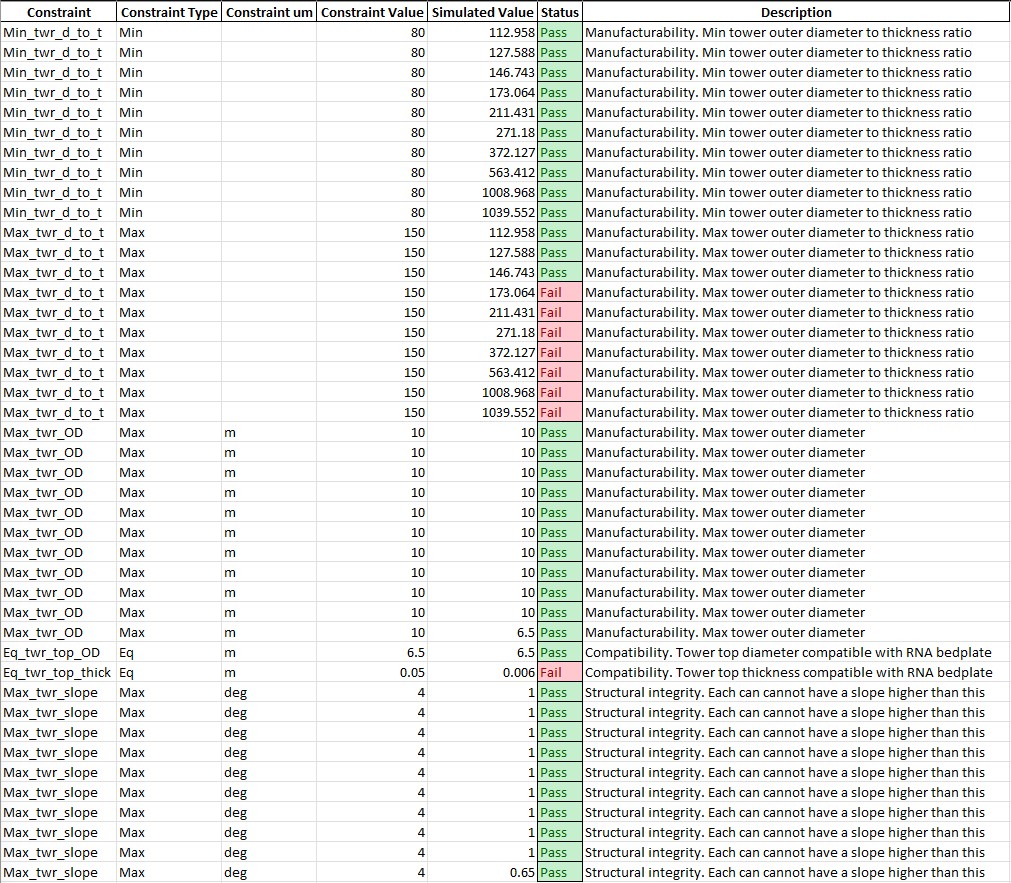
Analysis validation report example
Common errors
Permission error
PermissionError: [Errno 13] Permission denied: 'data/INPUT_tower.xlsx'
The file INPUT_tower.xlsx is still open on your pc. In order to be safely read by SCUBE, the file needs to be closed.
A similar error can occur for CNSTR.xlsx